Approvals is how RolloutIQ encodes your spending rules and routes financial decisions to the right people. Admins build approval matrices, one per type of decision and optionally scoped to a brand or region. Each matrix holds tiers defined by amount, and each tier names who signs and how. When a record is submitted, RolloutIQ resolves the right matrix, builds the chain of approvers, and walks it tier by tier in order. Delegations let you hand your approvals to a teammate when you are out of office.
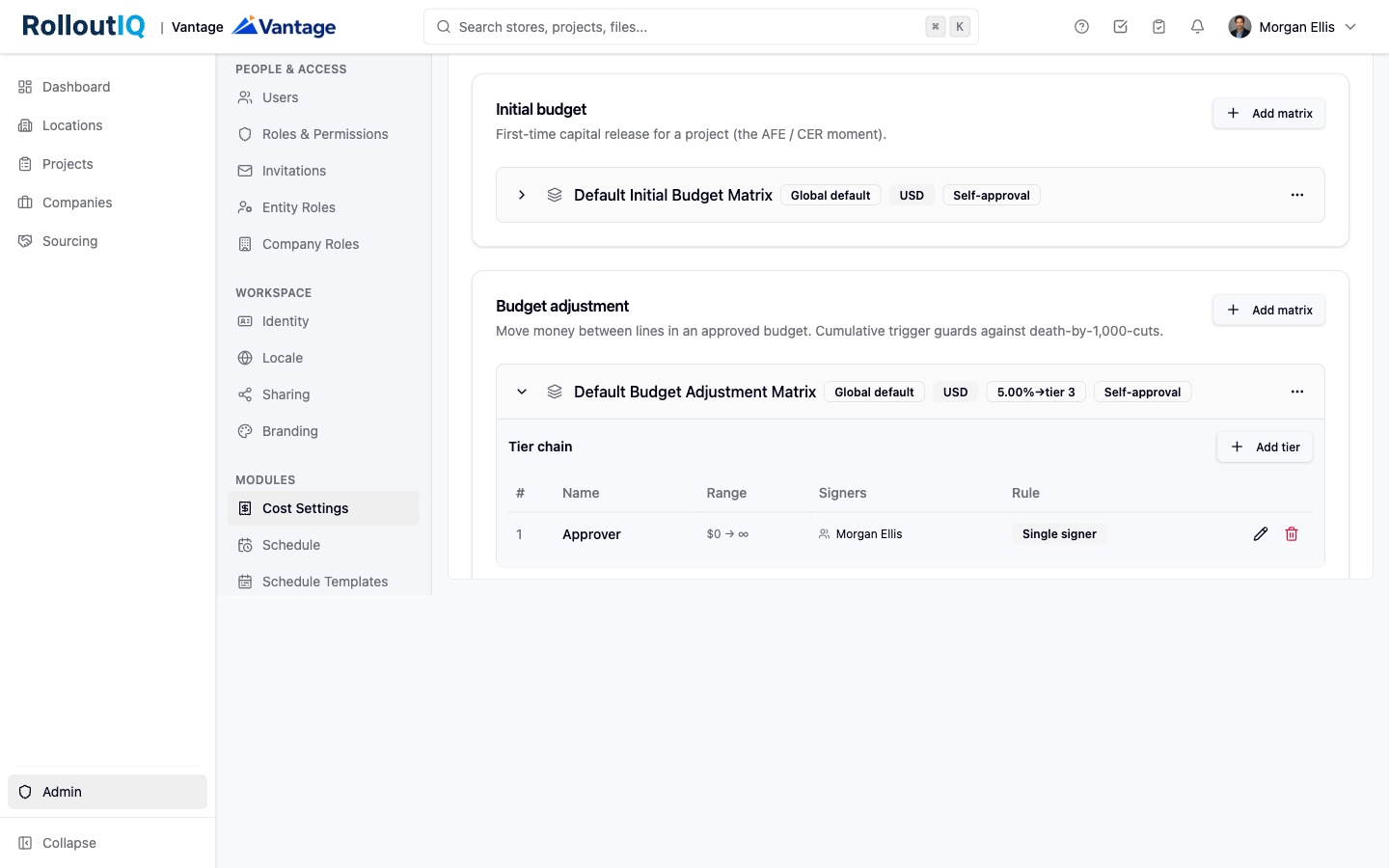
Matrices are set up in the admin area under Approvals. Managing them requires the approval-matrix admin permissions.
Choose the decision type. Initial budget, Budget adjustment, Change order, or Vendor contracts.
Set the scope and currency. Make the matrix global, or specific to a brand, a region, or a brand-and-region pair, and pick its currency. A project's currency must match the matrix it routes to, since approvals do not convert currency at decision time.
Add tiers. For each tier set the amount range, choose the signer (a role resolved against the project team, or specific named people), and choose the signing mode: single signer, any one signs, or all must sign. RolloutIQ orders the tiers by amount for you.
Optionally add the cumulative guard. Set a threshold percentage and the tier it escalates to, so once many small changes add up past a set share of the project budget, the next one gets a harder look. Use the preview tool to confirm which matrix a given decision type, brand, and region will resolve to.
A submitted record appears in the assigned signer's Approval inbox under Me, Approvals.
The current-tier signer can approve, reject, or return the record for revision, with a comment. The chain advances tier by tier in order, so everyone in the path is on record as having seen the cost.
A record is locked from edits while in review. Withdrawing or returning it unlocks it so it can be revised and resubmitted, which starts a fresh chain.
The person who submits a record cannot approve it, so every decision gets a second set of eyes. The one exception is a matrix where an admin has allowed self-approval for a small team.
Delegation lives in your account settings under Delegation, so decisions do not stall when you are away.
Pick your delegate. Choose the teammate who will cover for you and set the start and end dates. You can add an optional reason.
During the window, approvals that would have gone to you route to your delegate instead. Both names are recorded on every signature for a clean audit trail.
Each person has one active delegation at a time, it covers all of your approvals during the window, and it does not chain: your delegate cannot forward your approvals to a third person.
