Sourcing is the pre-award vendor pricing workflow for a project. You create a request, build a single pricing form that every vendor fills out the same way, invite vendors, and collect structured priced responses. Bids line up side by side for comparison, you award a winner through an approval chain, and the awarded number can flow into the project budget. Sourcing is switched on per account by the RolloutIQ team, so it may not be enabled for every workspace, and it prices against your existing cost categories.
Create the request. On a project's Sourcing requests tab choose New sourcing request. Pick the type (Bid, RFP, or Negotiated), give it a subject and instructions, set the response window, and pick the currency.
Apply a pricing template. This lays down the pricing form: the cost lines every vendor will price, each with its pricing method fixed (lump sum, unit price, time and materials, not to exceed, or cost plus fee). Locking the method per line is what keeps bids comparable.
Attach the package. Add drawings, specifications, site photos, and any reference documents. Invited vendors can open these to scope and price.
Set bid integrity and invite. Choose Strict to keep responses sealed until the window closes, or Open to see them as they arrive. Invite vendor companies, then publish. Publishing locks the pricing form and notifies vendors.
Invited vendors see the request in their cross-project inbox. They accept or decline, then price the form on a full-page editor grouped by cost family with running subtotals. A separate block captures percentage add-ons such as Overhead and Profit or sales tax where the form asks for them. Vendors add structured exclusions, qualifications, and assumptions, can attach their own backup files (hidden from competing vendors), and submit. Each submission is recorded as a version, and vendors never see who else was invited or what anyone else bid.
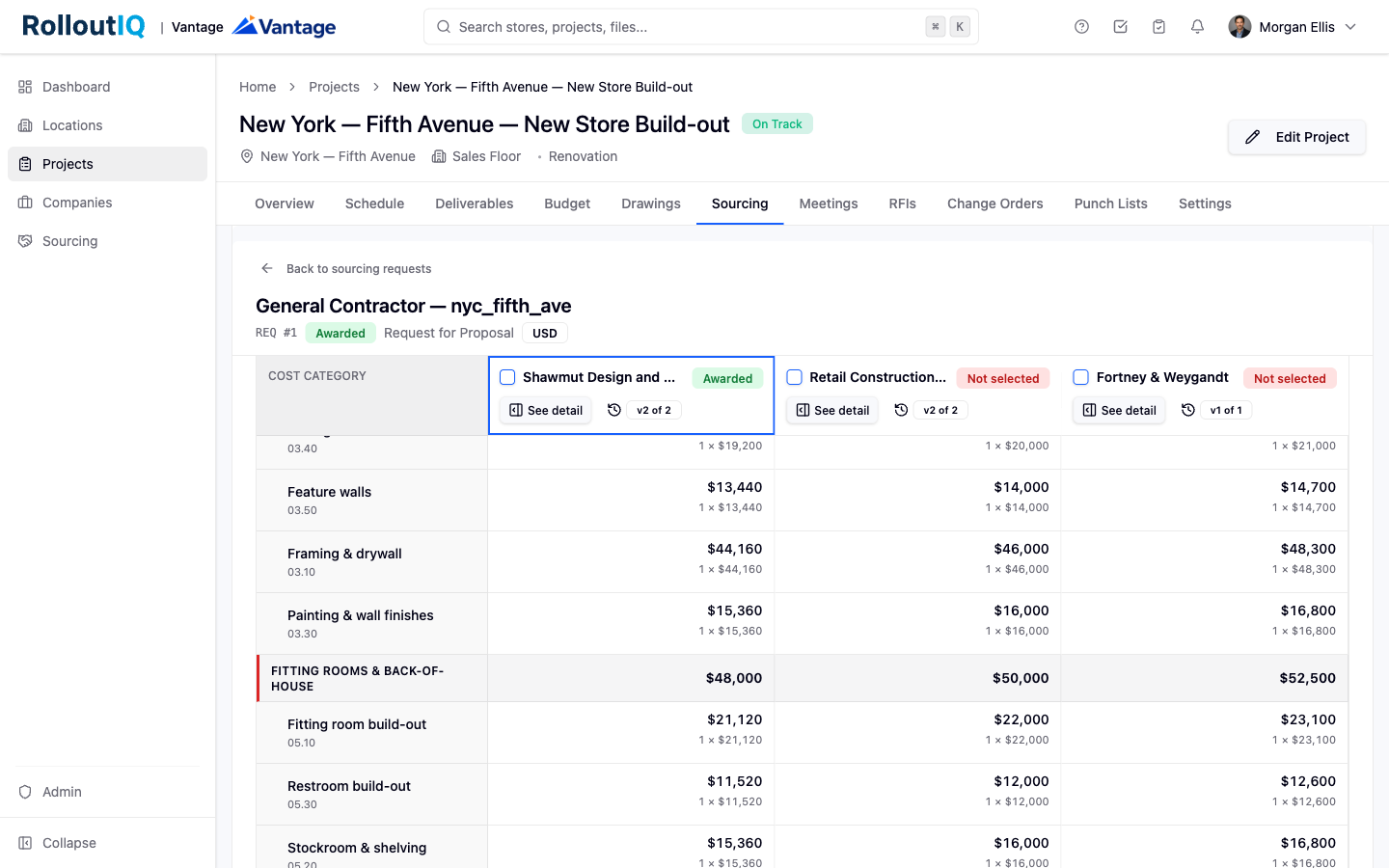
Open the leveling matrix to see every vendor as a column with their total and status, and each cost line as a row, with section subtotals and a grand total.
Spot outliers. Line items that sit unusually high or low against the other bids are flagged so they are easy to question.
Review a bid in depth. Open a single vendor's response to read its priced lines, exclusions and qualifications, narrative, and files, or compare two of their versions side by side.
Award the winner. If award approval is switched on, the award routes through your approval chain and becomes final once approved. Losing vendors can be notified automatically, and the awarded bid can feed the project budget.
By default the person who awards a request cannot also approve the award, so a commitment gets a second set of eyes. A workspace can opt into self-approval for small teams. Routing an award for sign-off needs an approval matrix configured for awards; without it, awards finalize immediately when award approval is off.
